
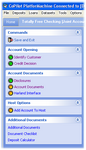
 dbPlatform, also known as Copilot Platformation, is a compliance oriented Loan
and Deposit account origination system. During the process of originating a new
account, dbPlatform uses a user friendly interface that allows the user to just
point and click to complete a task such as download credit report, generate disclosures
or add the account to the core processing system. The graphical interface allows
the user to be in control of the steps that need to be done when they need to be
done. It also can enforce polices that dictate certain steps must be completed before
continuing to the next. It allows the user to easily see which steps have been completed
and which steps still need to be done or is in the process of being done. dbPlatform
has an intelligent data collection process for gathering the minimal amount of data
based on the institution policies and the current phase of the account. It also
minimizes required input by interfacing with many third party systems. dbPlatform
automatically generates the appropriate documents needed for a new account based
on the information collected, so it removes all the guess work for the user. Add
in the Digital Authentication and automatic interfacing with the Document Imaging
system and you will find completing new account transactions are quick and effortless.
dbPlatform, also known as Copilot Platformation, is a compliance oriented Loan
and Deposit account origination system. During the process of originating a new
account, dbPlatform uses a user friendly interface that allows the user to just
point and click to complete a task such as download credit report, generate disclosures
or add the account to the core processing system. The graphical interface allows
the user to be in control of the steps that need to be done when they need to be
done. It also can enforce polices that dictate certain steps must be completed before
continuing to the next. It allows the user to easily see which steps have been completed
and which steps still need to be done or is in the process of being done. dbPlatform
has an intelligent data collection process for gathering the minimal amount of data
based on the institution policies and the current phase of the account. It also
minimizes required input by interfacing with many third party systems. dbPlatform
automatically generates the appropriate documents needed for a new account based
on the information collected, so it removes all the guess work for the user. Add
in the Digital Authentication and automatic interfacing with the Document Imaging
system and you will find completing new account transactions are quick and effortless.
Some institutions have specialized departments for certain functions of the account
origination process. For example, you may have a designated department who is responsible
for adding the account to the core processor or for making the credit decision for
certain loans. In this case dbPlatform has the ability for you to assign certain
security rights to specific users which can restrict which tasks they are allowed
to perform. Then through an account tracking feature users can monitor when accounts
are ready for them to perform their designated task for that account. Although this
is commonly known as centralized lending, it can be used for any number of purposes.
Compliance
 dbPlatform utilizes a compliant forms
determination engine to produce the documentation needed to meet State and
Federal compliance for all deposit and loan accounts. Operators are not
left with confusing decisions as to which documents are required to meet account
circumstances or State and Federal compliance regulations. DBS, Inc is a
partner with WKFS (Wolters Kluwer Financial Services formerly Bankers Systems
Inc) and provides compliant documentation backed by a compliance guarantee.
If your institution currently utilizes WKFS documents, implementing dbPlatform
provides a smooth transition as deposit and loan documentation is already
familiar to employees, compliance officers, and examiners.
dbPlatform utilizes a compliant forms
determination engine to produce the documentation needed to meet State and
Federal compliance for all deposit and loan accounts. Operators are not
left with confusing decisions as to which documents are required to meet account
circumstances or State and Federal compliance regulations. DBS, Inc is a
partner with WKFS (Wolters Kluwer Financial Services formerly Bankers Systems
Inc) and provides compliant documentation backed by a compliance guarantee.
If your institution currently utilizes WKFS documents, implementing dbPlatform
provides a smooth transition as deposit and loan documentation is already
familiar to employees, compliance officers, and examiners.
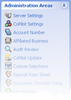 dbPlatform comes with a suite of administration programs that enable the institution
to be in control of configuring custom settings. You can build your own products,
specify product defaults, setup new branches, control all of your institution settings,
define account number ranges for auto-generation of account numbers, assign custom
logos on forms and many other administrative functions. These features are all wrapped
into a single, easy-to-use administration program.
dbPlatform comes with a suite of administration programs that enable the institution
to be in control of configuring custom settings. You can build your own products,
specify product defaults, setup new branches, control all of your institution settings,
define account number ranges for auto-generation of account numbers, assign custom
logos on forms and many other administrative functions. These features are all wrapped
into a single, easy-to-use administration program.
This system supports multiple institution holding companies. No institution is too
large or too small for this system. It can be configured to quickly open the everyday
common accounts as well as customized to handle to complex tasks that some markets
require.
There are many extras that come with this system. Just to mention a few of them;
- Instant Messenger
- When you need to obtain or share information with your coworkers, dbPlatform has
a messaging system built in so you can communicate with your coworkers fast and
efficiently.
-
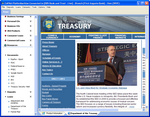 Interactive Desktop
- dbPlatform provides a configurable desktop to allow you to assign documents or web
pages to each of your products. You may also setup as many useful links to other
existing web sites your bank needs to reference. This provides access to those resources
while keeping the new account transaction just a click away.
- Official Checks
- You can generate official checks directly from dbPlatform.
- Digital Documents
- You can open any document in the system and fill in the data directly on the document
and send to a printer. This is often needed for forms not used during the account
opening process, such as a stop pay hold request or any other document you may need
that is not already part of our automated document generation system.
- Email Documents
- You can also email documents to anyone using one of the several secure methods which
can prevent any confidential information from being accessible to non-authorized
people.
-
 Electronic Signature / Digital Authentication
- dbPlatform provides the means to capture the customer's signature electronically.
That signature is then bound to all legal documents with the transaction. In addition
we can digitally tie all documents to a single Authentication and Consent Agreement
which the customer can sign in lieu of the other documents required for that transaction.
- Archive and Reporting
- dbPlatform can archive the information about each account whether it was approved
and opened or denied. You can then use any report writer of your choice to generate
reports from this data stored in a SQL database.
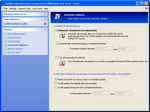 Your IT department will love dbPlatform when they see how quick and easy the
installation of dbPlatform is. It also comes with an automated update system so
your updates can now be a hands-off procedure. You just designate a time for your
updates to download and apply, then everything else is automatically handled for
you. The system will also enforce that all client stations are on the latest release.
Using the administration program you can also get an analysis of the client transfer
speed to assist you in optimizing your network configuration. We have also included
a Release Notes system. From the help menu you can find Release Notes. This explains
what technical or compliance changes are included in each update your institution
receives.
Your IT department will love dbPlatform when they see how quick and easy the
installation of dbPlatform is. It also comes with an automated update system so
your updates can now be a hands-off procedure. You just designate a time for your
updates to download and apply, then everything else is automatically handled for
you. The system will also enforce that all client stations are on the latest release.
Using the administration program you can also get an analysis of the client transfer
speed to assist you in optimizing your network configuration. We have also included
a Release Notes system. From the help menu you can find Release Notes. This explains
what technical or compliance changes are included in each update your institution
receives.
dbPlatform interfaces to many third party vendors. All vendors we interface with
may not be listed below. If you are interested in an interface between dbPlatform
and another third party interface then contact us for availability.
- Electronic Check Ordering
- Deluxe
- Harland
- Clarke American
- Identity Services
- ChexSystemssm
- Identity Verification
- OFAC
- QualiFile/New Account Chex
- Address Analysis
- Identity Authentication
- Red Flags Checklist
- BankCARS
- Credit Bureau
- Equifax
- Experian
- TransUnion
- Flood Determination
- ServiceLink National Flood (formerly LPS National) - Online Flood Service
- Core Processors
- DBS – dbCore
- Fidelity – BancPac
- Jack Henry – 20/20
- Modern Banking Systems
- Harland – Phoenix
- Call for other interfaces not listed.
- Document Imaging
The deposit system includes DDA, Savings, CDs and IRA accounts. Deposit accounts
are divided into two phases, Application/Disclosure Phase and Closing Phase.
Application Phase
The application phase is used to identify the owners, signers and beneficiaries.
As the information is being collected you can perform the identity verification
lookups and pull a credit bureau report, if your institution requires this step.
This phase will also be used to generate the account disclosures, either automatically
or under user control based on the product settings. And finally this phase can
be used to make an approval decision, if necessary.
Closing Phase
The closing phase is used to gather any final account information and generate all
your closing documents including a denial letter if this account was not approved.
You can optionally generate starter checks, place an online check order, generate
Automatic Transfer and add the account to your core processing system.
Other Deposit Features
- All phases may be customized to meet the requirements of your institution and to
streamline the process to make you as efficient as possible.
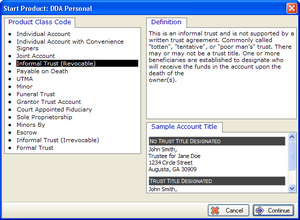
- Compliant account titles are automatically formatted based on the ownership type
determined by the selected class code.
- Supports unlimited number of owners, signers, and beneficiaries.
- Addendums are automatically generated and is transparent to the user.
- Starter Checks can be printed as part of the account documents.
- You can place online check orders to all the major vendors with just the click of
a button.
- Full control over printing can be configured one time, so the users don’t have to
remember how many copies of each form are required, or if a form is duplexed or
not and what printer they should go to if the institution has special printing requirements.
The loan system includes consumer, commercial, and lines of credit accounts. Loan
processing is divided into three phases, Application Phase, Disclosure Phase and
Closing Phase.
Application Phase
The application phase includes several processes and is used to identify the borrowers,
cosigners and guarantors. As the information is being collected you can perform
the identity verification lookups and pull a credit bureau report, if your institution
requires this step. This phase will also be used to determine the type of collateral
taken and the purpose of the loan. With this information, additional processes can
be determined to be needed. For example, if real estate is the collateral, the Flood
Determination step would become available in the processing flow. Rescission and
RESPA can be determined by the collateral and purpose so that the necessary disclosures
can be generated.
Applications, Credit Inquiries, and an automated Debt Analysis tool to compute DTI
ratios can be used during the application phase to assist in making a credit decision.
Once the decision is made, either the closing documents can be generated, if the
loan is approved, or the denial letter, if the loan is denied.
Closing Phase
The closing phase is used to gather any final account information and generate all
your closing documents including a denial letter if this account was not approved.
You can optionally generate proceed checks and coupon books, generate Automatic
Transfer and add the account to your core processing system.
Other Loan Features
- All phases may be customized to meet the requirements of your institution and to
streamline the process to make you as efficient as possible.
- Supports unlimited number of borrowers, cosigners, and guarantors.
- Addendums are automatically generated and is transparent to the user in the case
there are more signers than signature lines on any given form.
- The ability to enter unlimited number and combination of collaterals with different
owners. The collateral documents are then grouped and automatically generated based
on common collateral owners.
- Proceeds Checks and Coupon Books can be printed as part of the account documents.
- Full control over printing can be configured one time, so the users don’t have to
remember how many copies of each form are required, or if a form is duplexed or
not and what printer they should go to if the institution has special printing requirements.
|
|
Request Product Information or Live Demo
|
|
Contact us to learn how Digital Banking Solutions can provide
your institution with solutions to all your regulatory, technical and operational
needs. Our solutions will help your institution run smooth by keeping you up-to-date
with regulatory requirements, through our easy-to-use software all while saving
you money.
To request a live demo or to receive more information, you may complete the form below,
email us at: sales@dbsinc.com,
or call us toll free at 855-807-6588.
|